Working with MSI Packages
Windows Installer (MSI) is an operating system service for installing and uninstalling software. Paquet Builder lets you wrap MSI setups and MSP patches into a single self-extracting .exe, ideal for distribution over the internet, email, or removable media.
Creating an MSI Setup Package
Section titled “Creating an MSI Setup Package”-
Create a Package for Setup: choose the Setup Routine type.
-
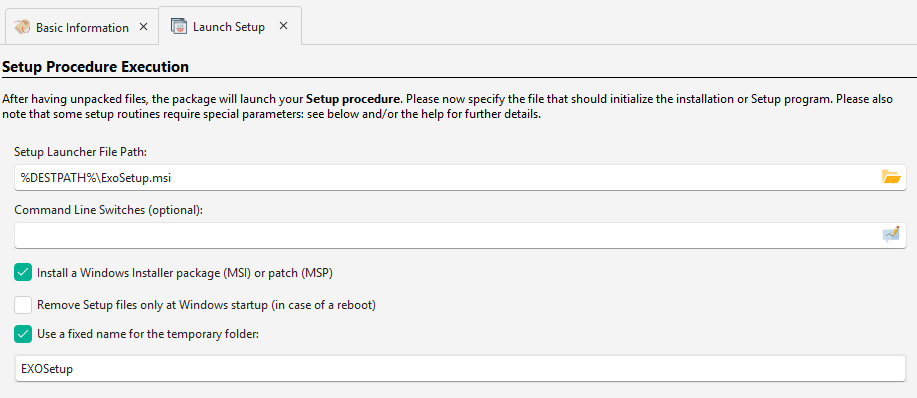
In the “Choose Setup Program” panel, select “Install a Windows Installer package (MSI) or patch (MSP)” and pick your file:
-
Enable “Use a fixed name for the temporary folder”. Windows Installer remembers the source folder for repairs and updates, so a consistent name ensures it can locate files.
-
For multiple MSI setups or prerequisites, add custom actions.
Advanced MSI Actions
Section titled “Advanced MSI Actions”Administrative installations, product advertising, and other advanced operations are available through the Install MSI Package custom action.
Compressing MSI Files with 7-Zip
Section titled “Compressing MSI Files with 7-Zip”You can significantly reduce MSI/CAB file sizes using Paquet Builder’s LZMA2 and BCJ2 compression:
- Disable CAB compression: set
CompressionLevelto “none” in your MSI’s Media settings. - Keep CAB files external: do not embed them inside the MSI.
- Add MSI + CAB files to Paquet Builder: 7-Zip compression delivers much better ratios than the LZX used in Cabinet format.