Paquet Builder MCP Server AI control for Windows installers
A free add-on that plugs Paquet Builder's installer engine into any MCP-compatible AI assistant. Ask Claude Code, Cursor, Windsurf, or VS Code Copilot to open, edit, and compile your .pbp projects, no GUI required.
Requires Paquet Builder 2026 to be installed first.
See it in action
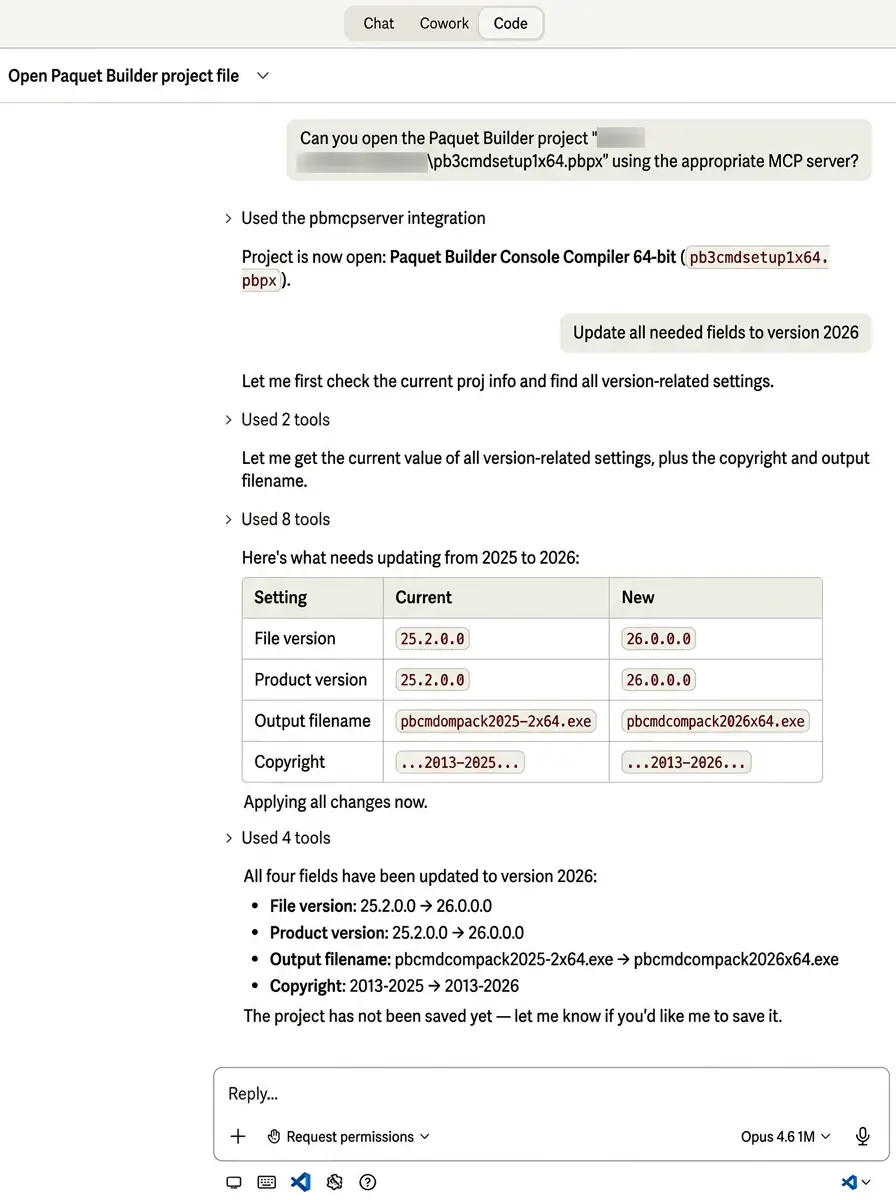
A real Claude Code session.
Real project. Real output.
Claude Code opens an existing installer project, finds every version-related setting, and bumps them to the next release. All from one instruction.
- 01 Opens pb3cmdsetup1x64.pbpx through the pbmcpserver integration
- 02 Scans 8 tools to find every version-related setting automatically
- 03 Applies all 4 changes (file version, product version, output filename, copyright) in one pass
The basics
What is an MCP server, exactly?
The Model Context Protocol is an open standard, published by Anthropic and adopted across the AI industry, for letting AI assistants talk to external tools in a consistent, structured way. An MCP server is a small program that speaks this protocol and exposes a set of actions ("tools") the AI can invoke.
The Paquet Builder MCP Server is a domain-specific MCP server: it does one thing, and does it well. Instead of offering generic file or shell access, it understands .pbp installer projects natively. That means an AI agent can reason about your project at the right level (versions, files, shortcuts, custom actions, build settings) rather than blindly editing XML.
The server groups its capabilities into a handful of categories: project lifecycle (open, create, save), settings and variables, files and shortcuts, custom actions, build and output, and documentation lookup. See the full tool reference for the complete catalog.
How it connects
AI client
Claude Code · Cursor · Windsurf
PBMCPServer
The translator
Paquet Builder
Your .pbpx installer project
Who it's for
Built for teams who already live in an AI coding tool
If your day already runs through Claude Code, Cursor, or Windsurf, the MCP Server lets installer work join that same workflow, instead of forcing you to context-switch back to a GUI.
Solo developers
Ship small tools and utilities fast. Describe what the installer should do, let the AI draft the .pbp, review, compile.
CI/CD engineers
Wire up reproducible installer builds on Windows build agents. Use AI-driven release notes, version bumps, and pre-flight checks without pausing the pipeline.
Installer maintainers
Stop doing the same version bumps and checklist edits across dozens of projects by hand. Drive them in bulk from one conversation.
Compatibility
Works with your AI coding tools
MCP is an open standard, so any compliant client can connect. Claude Code is the primary integration; three other major tools connect the same way.
Primary integration
Claude Code
Best for batch work and scripted release flows. Run it headlessly inside a terminal or CI agent, hand it a prompt like "bump version to 3.2, rebuild all 12 installers", and walk away.
Cursor
Best for hybrid app + installer projects. When your source code and the installer live in the same repo, Cursor edits both in one session.
Windsurf
Best for conversational refactors. Cascade mode walks through legacy .pbp files, proposes modernizations, applies them in one go.
VS Code + Copilot
Best for teams already standardized on VS Code. Copilot's agent mode picks up the MCP server like any other tool, with no new IDE to learn.
Need setup steps? Head to the setup guide, with one section per client.
In practice
What teams actually do with it
Refactor legacy projects conversationally
Inherited a 10-year-old .pbp nobody understands? Ask your AI to walk through it, explain each section, and propose modern equivalents. The MCP Server gives the agent real context instead of guessing from opaque file diffs.
Bump versions across a portfolio
Ask once, update many. "Set the version to 4.1.0 in every installer under D:\products and rebuild them." The agent opens each .pbp, updates the setting, compiles, and reports back with build logs, all in a single session instead of an afternoon of repetitive clicking.
Generate new installers from a spec
Point your AI at a requirements doc or README, and let it draft a Paquet Builder project: file list, shortcuts, registry keys, custom actions. You review the generated .pbp in the GUI afterwards to sanity-check, but the tedious structural work is already done.
Run builds from your CI pipeline
Combine the MCP Server with the console compiler on a Windows build agent. Your pipeline can use an AI step to handle release notes, QA checks, or last-mile customization, with the MCP Server as the authoritative project-editing layer.
Two AI features
MCP Server vs. built-in AI Assistant
Paquet Builder ships two distinct AI features. They complement each other. Here is how to pick.
Built-in AI Assistant
Inside the Paquet Builder GUI
- Guided, conversational edits while you click around
- Ideal when you're actively designing the installer
- No external tooling required
- Great for one-off questions and setting lookups
MCP Server
Outside the GUI, with your coding agent
- Headless: runs without opening the GUI
- Ideal for batch, scripted, or CI workflows
- Works from Claude Code, Cursor, Windsurf, VS Code
- Great for cross-project operations at scale
Questions
Frequently asked
What is the Paquet Builder MCP Server?
It is a free add-on that exposes Paquet Builder's installer engine through the Model Context Protocol (MCP). Any MCP-compatible AI assistant (Claude Code, Cursor, Windsurf, VS Code with Copilot) can then read, edit, and compile your .pbp installer projects directly, without opening the Paquet Builder GUI.
Is the MCP Server free?
Yes. The MCP Server is a free add-on for every Paquet Builder user, including the Freeware edition. You download it separately from the main Paquet Builder installer.
Which AI tools work with the Paquet Builder MCP Server?
Any MCP-compatible client, including Claude Code (Anthropic), Cursor, Windsurf, and VS Code with GitHub Copilot in agent mode. If your tool supports MCP servers, it can connect to Paquet Builder.
Do I need a paid edition to use the MCP Server?
No. The MCP Server itself is free and works with every edition. The same feature restrictions that apply inside the Paquet Builder GUI (for example, custom actions or encryption) still apply when an AI drives the build, so Pro or Ultimate unlocks more capabilities at compile time.
Can I use the MCP Server in CI/CD pipelines?
Yes. Because the MCP Server is headless, you can run it on a Windows build agent and let your CI pipeline drive it through an AI agent or directly through directive files. Combined with the console compiler, it fits batch and automated release workflows.
How is this different from Paquet Builder's built-in AI Assistant?
The built-in AI Assistant runs inside the Paquet Builder GUI to help you configure a project interactively. The MCP Server runs outside the GUI and lets your existing coding agent operate on .pbp files directly, ideal when you already live in Claude Code or Cursor and want installer tasks there.
What version of Paquet Builder do I need?
Paquet Builder 2026 or later. The MCP Server installer will detect and install alongside your existing Paquet Builder installation.
Does it work on macOS or Linux?
The MCP Server binary itself runs on Windows, where Paquet Builder is installed. Your AI client can run on any platform that can reach the Windows host, so you can drive a build from a Mac or Linux workstation as long as the Paquet Builder machine is reachable.
Still reading? You're exactly the kind of dev we built this for.
Free, works with your existing AI tool, installs in under a minute.
Ready when you are
Ready to plug in your AI?
Download the free MCP Server add-on and have Claude Code, Cursor, or Windsurf driving your next installer build in minutes.