Protect Installers
Lock down your packages. Ship with confidence.
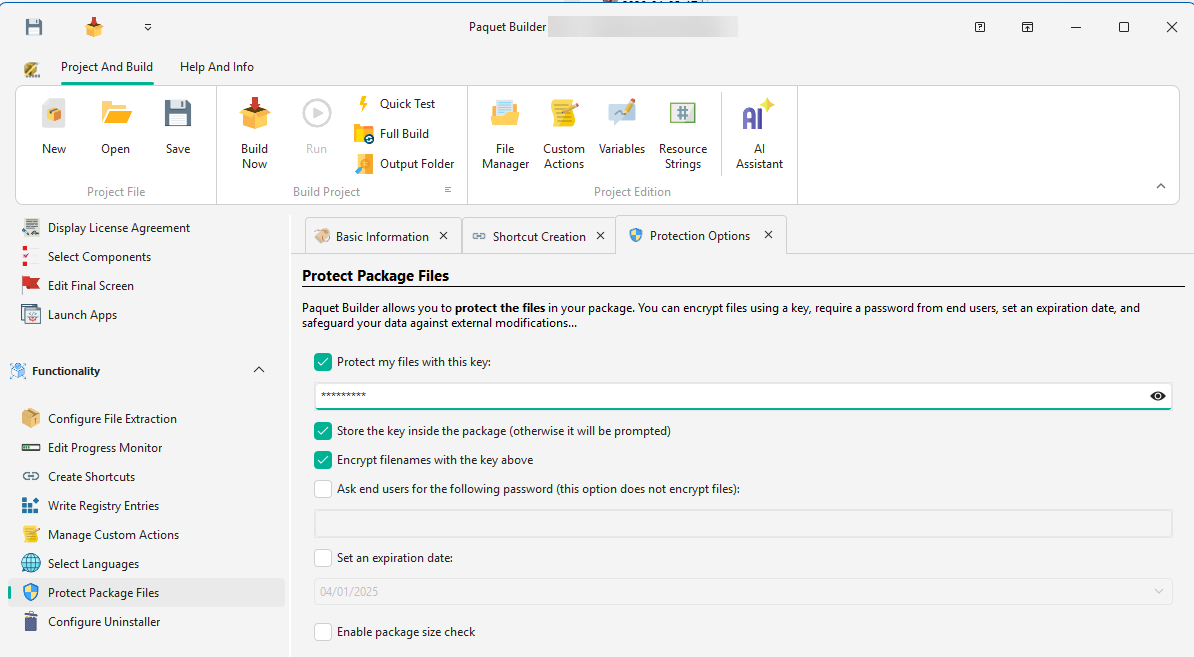
Password protection, AES encryption, CRC32 integrity checks, and Authenticode digital signing: everything you need to secure your installers against tampering and unauthorized access.
Protect Installers
Passwords
and encryption
Restrict access to your package contents with single or multiple passwords. Users can be prompted during installation, or passwords can be supplied silently for automated deployments.
- Single or multiple passwords
- Require one or more passwords to access the package contents. Each password can unlock different parts of the installer.
- Trial expiration date
- Set an expiration date to limit usage or enforce licensing terms. The installer will refuse to run past the deadline.
- 7-Zip encryption
- Optionally encrypt installer contents with 7-Zip encryption to protect your files from extraction and reverse engineering.
CRC32 verifies
every byte.
Every file is checksummed at build time and verified during extraction. Truncated downloads, corrupted bytes, and unauthorized modifications are all caught before a single file is written to disk. Your end users get exactly what you shipped, or nothing at all.
Code Signing
Authenticode signing,
fully automated
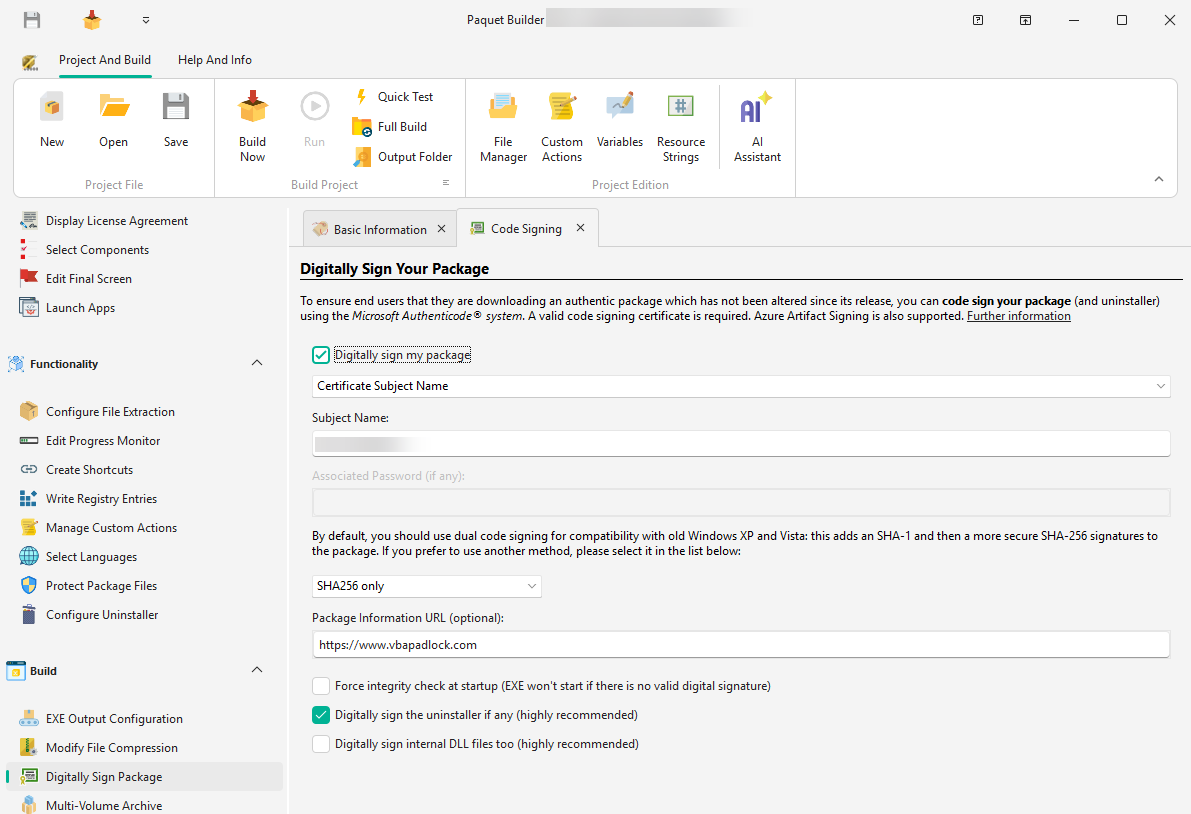
Digitally sign your installer packages with a publisher certificate. Paquet Builder supports SHA-256, dual SHA-1 + SHA-256 signing, and automates all code-signing operations including time-stamping with RFC 3161 compatible servers.
- SHA-256, SHA-1, or dual SHA-1 + SHA-256 signing for broad compatibility
- Time-stamping with RFC 3161 compatible servers
- Azure Key Vault, PFX files, and hardware dongles (HSMs, YubiKey, SafeNet eTokens)
- Sign from CI with the command-line builder: GitHub Actions, Azure Pipelines, or Jenkins
New to code signing?
Authenticode is Microsoft's code-signing standard. A certificate from a trusted Certificate Authority proves your installer came from you and hasn't been tampered with.
RFC 3161 is the standard for timestamping signatures. It keeps your signed installer valid even after your certificate eventually expires.
Verified Publisher
Your verified name,
in every UAC prompt.
Every admin install on Windows triggers a User Account Control prompt. Unsigned installers show a yellow warning with "Publisher: Unknown"; signed installers show a blue bar with your verified company name. Users instantly recognize what they're installing: fewer abandoned installs, fewer support tickets.
Do you want to allow this app to make changes to your device?
- Program:
- setup.exe
- Publisher:
- Unknown publisher
- File origin:
- Hard drive on this computer
Do you want to allow this app to make changes to your device?
- Program:
- setup.exe
- Verified publisher:
- G.D.G. Software
- File origin:
- Hard drive on this computer
Keep Touring
Move through the feature set without jumping back to the grid
Use the pager to continue the product tour, or jump back to the full overview at any point.
Customize & Theme
Design your package look and feel with custom themes, welcome screens, progress monitors, and branded dialogs.
Overview
See all features
Code Signing
Sign your installers with PFX, SignTool, JSign, or Azure Artifact Signing. SHA-256 dual signing and hardware token support.
Ship secure, signed installers
Download Paquet Builder and protect your installers with passwords, integrity checks, and Authenticode signing.