Console Compiler
Build from the command line.
No GUI needed.
Compile Paquet Builder projects without invoking the graphical interface. Designed for CI/CD pipelines, automated distribution cycles, and scheduled build tasks.
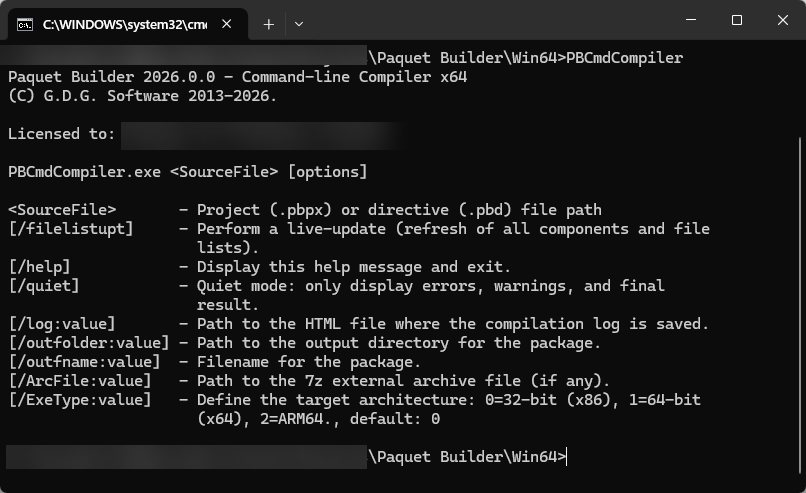
Console Compiler
Compile Without the GUI
The console compiler is a Windows console application that lets you compile Paquet Builder projects without invoking the graphical interface. It has no interface of its own and is designed for process automation, automatic distribution cycles, and scheduled tasks.
- Pure console application
- No graphical interface, no window chrome. Runs cleanly in any terminal or CI runner.
- Built for automation
- Ideal for CI/CD pipelines, cron jobs, and automated distribution cycles.
- Zero-config setup
- Set up automatically via the provided installer. Ready to use immediately.
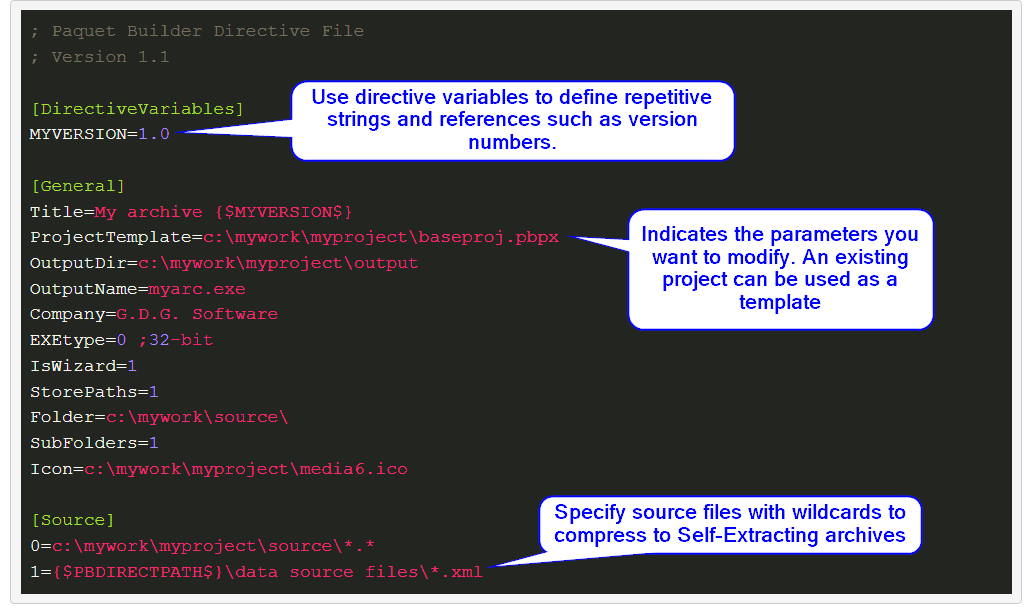
Script builds with text directives
The console compiler fully supports text-based directives: simple .ini-style files that customize packages, swap source files, override version info, or create entirely new projects from scratch. Combine directives with command-line switches for fully unattended builds.
- Transform or create
- Override settings on existing projects or define a complete package from a directive file alone.
- Version-control friendly
- Plain text format works seamlessly with Git and any diff tool.
Requirements
Paquet Builder must be installed and activated on the computer where you want to use the console compiler. The console compiler relies on the same resources as Paquet Builder itself, and these resources are not included with the console compiler download.
Standard license
Activate Paquet Builder GUI first, then the console compiler inherits the activation.
Floating license
Follow the instructions provided with your license for headless environments.
Ultimate Edition
The console compiler is available to registered users of the Paquet Builder Ultimate edition. It is set up on your computer via the provided installer.
Keep Touring
Move through the feature set without jumping back to the grid
Use the pager to continue the product tour, or jump back to the full overview at any point.
MCP Server
Control Paquet Builder from Claude Code, Cursor, or Windsurf via the Model Context Protocol. 20+ tools, fully headless.
Overview
See all features
Design Packages
Create self-extracting archives and themed packages with advanced compression. Build x86, x64, and ARM64 packages.
Automate Your Installer Builds
Download Paquet Builder and use the console compiler for process automation and scheduled distribution tasks.