Silent Installation
Build silent installers for Windows
Installers that deploy themselves.
Ship Windows installers that run end-to-end without a single dialog. One checkbox turns any Paquet Builder project into a silent package. Add a /s command-line trigger, then plug the structured exit codes into SCCM, Intune, and CI/CD pipelines.
Shipping since 2006 · Keep your EXE, no MSI authoring · Windows 7 through 11 · 20+ years of installer edge cases already handled
Why silent install matters
One capability. Two audiences.
Silent installers solve different problems for different teams. Paquet Builder handles both from the same project, with no separate build and no conditional wiring.
Independent developers
Give end users a setup that just works
No dialogs to click through, no language selection pop-up, no Next > Next > Finish fatigue. Ideal for auto-updaters, bundled-runtime installs, and download-and-run distribution.
- Silent background installs from email links, download pages, or in-app updaters
- Bundle prerequisite EXE or MSI setups and run them silently too
- No Windows Installer authoring required, keep shipping EXE
Enterprise & DevOps
Deploy at fleet scale with the tools you already run
Silent installers plug straight into Microsoft Endpoint Manager, Intune, Group Policy, PDQ Deploy, and Windows CI runners with no repackaging and no interactive desktop session on the target machine.
- Structured exit codes branch success / warning / failure in scripts
- Works headless on build agents with no interactive desktop session
- One project, one silent installer for Windows 7 through Windows 11
How it works
Three steps. One checkbox away.
-
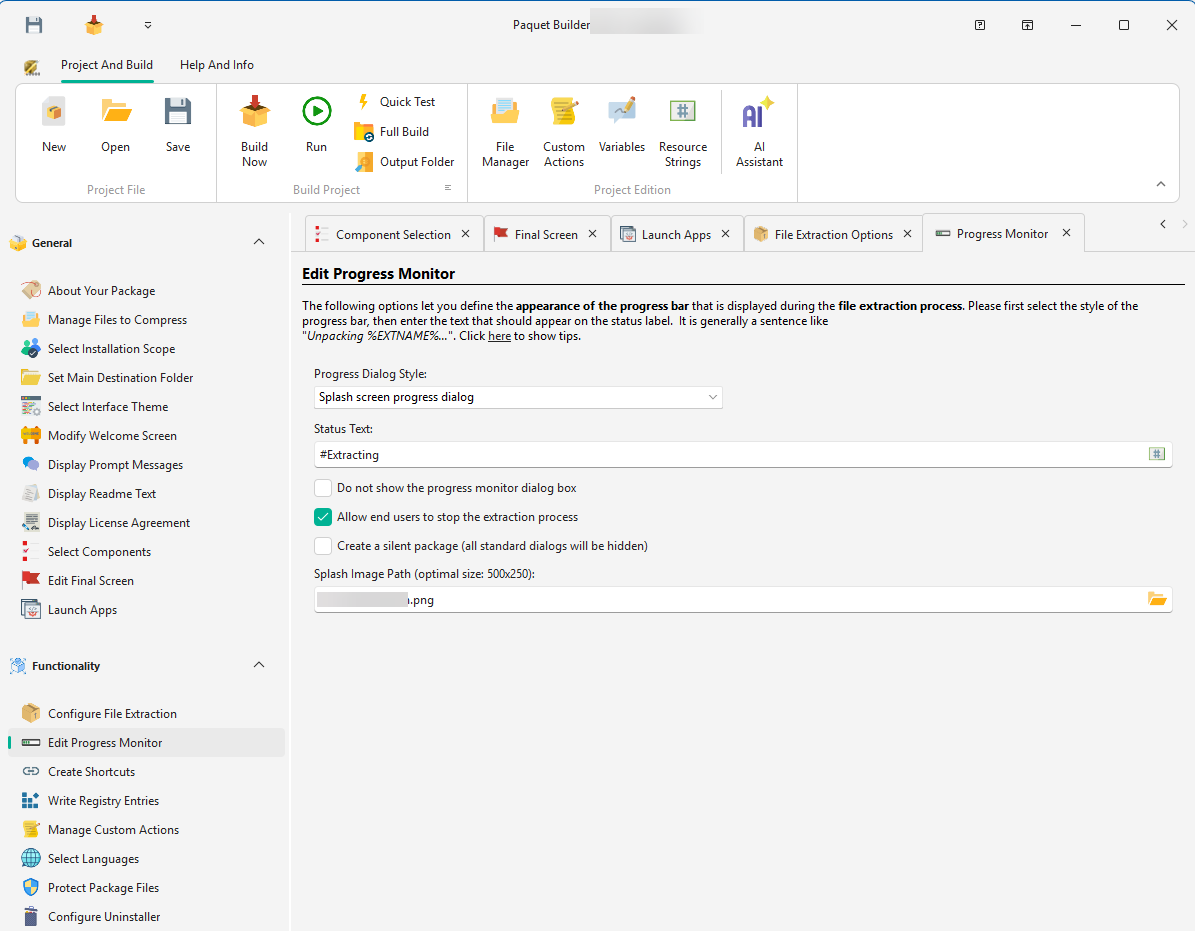
Enable silent mode
Open your project, tick "Silent package" in the Progress Monitor for an always-silent build. Prefer opt-in? Leave it unchecked. Since 2026.1, the runtime natively recognizes
/sand/silentat launch, no action template required. -
Build your package
Produce a single signed EXE (x86, x64, or ARM64) from the same project. No repackaging step, no MSI authoring, no external wrapper. Files, shortcuts, registry entries, and custom actions all travel inside, ready to run silently.
-
Deploy hands-free
Distribute the EXE however you want: updater, MDM policy, SCCM package, Intune Win32 app, PowerShell script. Invoke it once and let exit codes tell your tooling whether the install succeeded.
Wrap existing setups
Create a silent installer from an existing EXE or MSI
Already have a setup program? Choose the Setup Routine package type to wrap it into a single EXE, or bundle several setups and run them back-to-back for one unattended install.
-
One existing setup
A Setup Routine package extracts the setup to a temporary folder and launches it. Enter its silent switch in the command-line switches field.
-
Several setups or prerequisites
Add an Execute a Program action per EXE (parameters, hidden window, wait until end, exit code), or an Install MSI Package or Update action per MSI or MSP with
/qnin its additional parameters. -
Know what stays interactive
Silent mode hides Paquet Builder's standard dialogs; your own prompt messages and custom action dialogs still appear, so remove them or run them only when
%SILENT%is not set. A wrapped setup runs silently only when you pass its own silent switch. To keep it interactive in normal mode and silent when your package runs with/s, put two Execute a Program actions, with and without the switch, in a Conditional If/Then/Else on%SILENT%.
| Setup type | Silent switch | Note |
|---|---|---|
| Windows Installer (MSI) | /qn | Add /norestart to postpone a required reboot. |
| NSIS | /S | Case-sensitive: uppercase S. |
| Inno Setup | /VERYSILENT /SUPPRESSMSGBOXES | /SILENT still shows a progress window. |
| InstallShield (Basic MSI) | /s /v"/qn" | InstallScript projects need a response file recorded with /r, then /s. |
| Paquet Builder | /s or /silent | Recognized natively since 2026.1, case-insensitive. |
Silent install in code
Your switches, your contract.
Trigger silent mode with the built-in /s switch (parsed natively by the runtime since 2026.1), then define any additional switches your deployment tooling needs. A Paquet Builder silent installer is a standard Windows EXE with a well-defined command-line contract. Drop it into whichever management stack your IT team runs.
/s and /silent parsed natively (2026.1+)
Custom switches via %PARAMS% %EXITCODE% you control
Exit-code reference
Enterprise cheat sheet
Schedule and push silent installs
Push the same EXE to every machine with SCCM, Intune, PDQ Deploy, or a Group Policy startup script, or schedule an unattended install for off-hours with Windows Task Scheduler. Copy-paste ready for your deployment tool:
# Installation Program
MYAPP-SETUP.EXE /s

# Detection Method - file presence
File: C:\Program Files\MyApp\myapp.exe
Exists: True# Wrap the EXE with the Microsoft Win32 Content Prep Tool
IntuneWinAppUtil.exe -c .\source -s MYAPP-SETUP.EXE -o .\out
# In the Intune portal
Install command: MYAPP-SETUP.EXE /s
Uninstall command: "C:\Program Files\MyApp\uninstall.exe" /s$p = Start-Process -FilePath .\MYAPP-SETUP.EXE -ArgumentList '/s' -Wait -PassThru
if ($p.ExitCode -ne 0) {
throw "Install failed with exit code $($p.ExitCode)"
}rem From an elevated prompt: run the installer once at 22:00 as SYSTEM, whether or not a user is logged on
schtasks /create /tn "Install MyApp" /tr "C:\Deploy\MYAPP-SETUP.EXE /s" /sc once /st 22:00 /ru SYSTEMAlso works with Group Policy startup scripts, PDQ Deploy, and any Windows CI runner. See full build automation →
Silent installer questions, answered.
Is a silent installer the same thing as an unattended install?
They overlap but aren't identical. Silent means no UI shown; unattended means no user interaction required. A Paquet Builder silent installer is both: it hides all dialogs and uses your project's configured defaults, so nothing waits for input.
What is the best tool for silent, unattended software installation on Windows?
It depends on what you install. To put common third-party apps on many PCs, a package manager such as Chocolatey or winget, or Ninite for popular free apps, is usually simpler: those tools already know each app's silent switches and fetch the latest version. To ship your own software, or to combine your files, prerequisites, and existing EXE or MSI setups into one signed installer that works offline, an installer builder such as Paquet Builder is the better fit: you decide the silent behavior, the exit codes, and the signature, and the result runs with /s in SCCM, Intune, or a script.
Does silent install bypass UAC?
No. Windows security still governs elevation. If your installer needs admin rights, UAC will still prompt unless the process is already elevated (e.g. launched from an elevated SCCM client, Intune's SYSTEM context, or a Run As Administrator shell). Paquet Builder respects the Windows manifest you configure.
How do I test my silent installer?
Run the built EXE from an elevated cmd.exe or PowerShell with the /s flag and check %ERRORLEVEL% (or $LASTEXITCODE) for a non-zero value. For deeper visibility, add a custom action that writes progress to a log file. See the custom actions reference.
Can I deploy it via SCCM or Intune?
Yes. For SCCM, use the EXE as the install command with /s and a file- or registry-based detection rule. For Intune, wrap the EXE with the Microsoft Win32 Content Prep Tool and configure install/uninstall command lines the same way, no MSI required. Ready-to-paste snippets above.
What exit codes does the installer return?
0 for success and a documented set of non-zero codes for specific failure modes (user cancellation, extraction error, custom-action failure, etc.). Full list in the exit-code reference.
Ship installers that deploy themselves.
Download the full-featured trial and turn your next build into a silent installer in minutes.
Prefer a walk-through? Read the step-by-step tutorial.
The GUI toggle, the command-line action template, and silent nested setups, documented step by step with screenshots.
Read the tutorial