Remove locked files at startup
The uninstaller removes in-use files (e.g. shared DLLs) during the next Windows reboot.
The uninstaller is an application generated by your package that removes installed files, registry entries, shortcuts, and other changes. This page configures its properties.
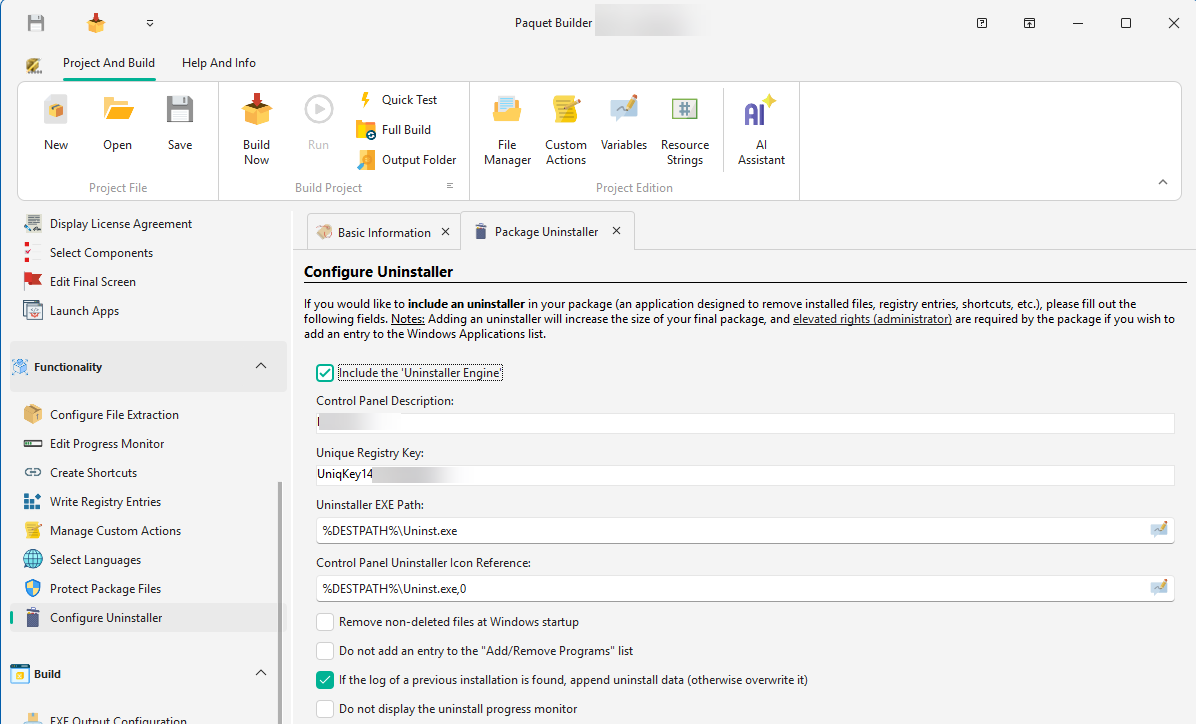
| Field | Description |
|---|---|
| Control Panel Description | Text displayed in Add/Remove Programs (e.g. My Application 1.7) |
| Unique Registry Key | A unique subkey name for the registry (e.g. CompanyName_App_1.0 or a GUID). Retrievable at runtime via %PBUNINSTREGKEY% |
| Uninstaller EXE Path | Full path for the generated executable (e.g. %DESTPATH%\Uninstall.exe). A .log file is created alongside it |
| Icon Reference | Icon for the Add/Remove Programs entry: .ico file or resource in .exe/.dll (e.g. %DESTPATH%\Uninst.exe,0) |
Remove locked files at startup
The uninstaller removes in-use files (e.g. shared DLLs) during the next Windows reboot.
Hide from Add/Remove Programs
Does not create a Control Panel entry. Ensure users have another way to run the uninstaller.
Append to existing logs
If a previous .log file exists, new changes are appended instead of overwriting, which is useful for packages that install different components over time.
Hide progress monitor
Runs the uninstaller silently without showing a progress bar.
Skip admin check
Allows non-administrators to run the uninstaller. Changes the requested execution level from Require Administrator to Highest Available.
%SILENT% to 1. This prevents all prompts (except unexpected errors) during uninstallation.