Solid archive
Compresses all files as one continuous data stream for better compression ratios. Recommended for Self-Extracting packages.
Paquet Builder uses 7-Zip to compress source files into the package. This page controls path storage, compression level, and advanced archive parameters.
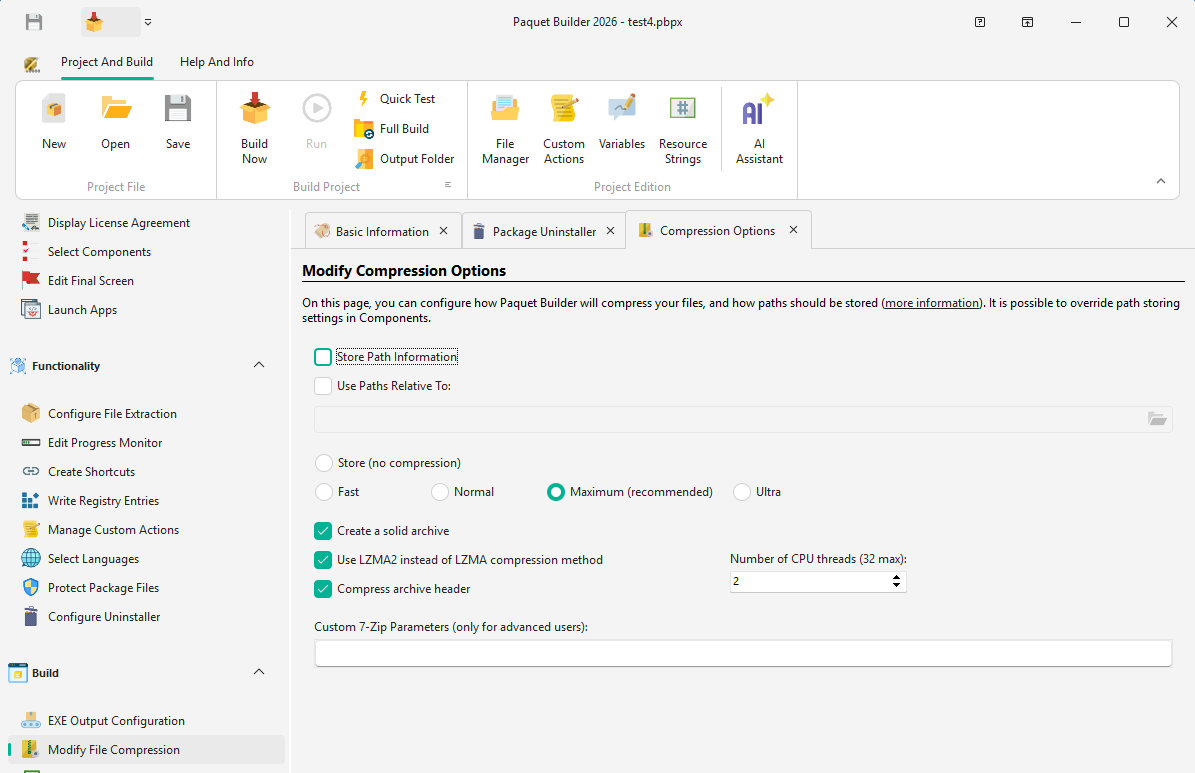
When source files come from multiple folders, you may need to preserve the folder structure in the archive.
Enable “Store Path Information” to include the full path (excluding drive letter) for each file.
Example:
C:\My Documents\My Results\Report.pdfMy Documents\My Results%DESTPATH%\My Documents\My Results\Enable “Use Paths Relative To” and specify a root folder to store only a portion of the path.
Example (root: C:\My Documents):
C:\My Documents\My Results\Report.pdfMy Results%DESTPATH%\My Results\Files outside the root folder still store their full paths.
| Level | Description |
|---|---|
| Store | No compression; files are stored as-is |
| Fast | Fastest compression, minimal ratio |
| Normal | Balance between speed and ratio |
| Maximum | Excellent ratio, recommended for most cases |
| Ultra | Best ratio, but requires significant RAM (350 MB+) |
Solid archive
Compresses all files as one continuous data stream for better compression ratios. Recommended for Self-Extracting packages.
LZMA2 multithreading
LZMA2 supports multithreaded compression and decompression, improving speed on multi-core systems. You can specify the number of CPU threads.
Compress archive header
Compresses file metadata and archive headers for a smaller overall package size.
Custom 7-Zip parameters
Override defaults with custom 7-Zip commands. Use | to separate parameters (e.g. 0|BCJ2|1|LZMA2:d24).