Go to a Label
This custom action transfers the package execution to the statement marked by the specified label. To mark a statement, you must first declare the label using the “Define a label” custom action. See an example below.
Properties
Section titled “Properties”| Property | Data Type | Description |
|---|---|---|
| LabelName | String | Identifies the label the script will jump to. A label name can be any valid identifier or any numeral between 0 and 9999, like LABEL1, RETURN25, etc. |
All labels must be declared with a “Define a label” custom action before they can be used with a Go To Label action.
Example of using Go to label
Section titled “Example of using Go to label”On this screenshot you can see an example of the use of “Define a label” / “Go to a label” custom actions. We ask end users for their name and create a loop: they will be prompted to enter their name until they provide a non-blank value.
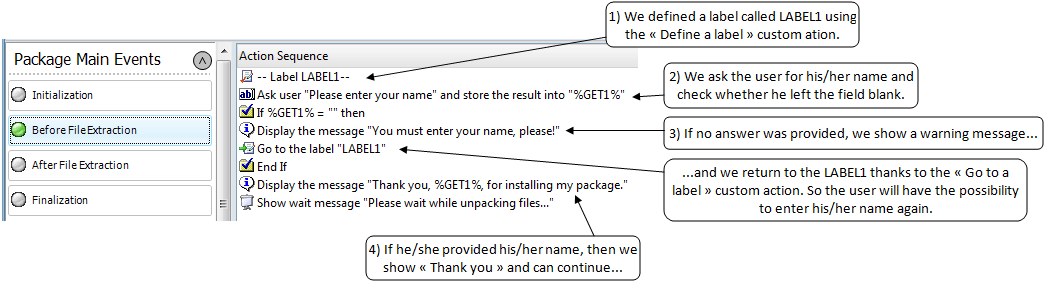
This can be used to check values provided by users (folders, etc.), to jump to specific blocks of instructions when a condition is not met, etc.
Restrictions
Section titled “Restrictions” Action Catalog Browse all available custom actions.