Ask User for One or More Choices
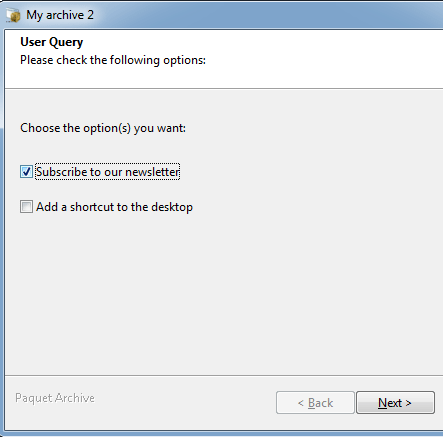
This custom action displays a dialog box allowing end users to select one or more options (check boxes). It is useful for scenarios like deciding whether to install specific components (see components) or configuring conditional workflows using if/then/else actions.
Properties
Section titled “Properties”| Property Name | Data Type | Description |
|---|---|---|
| Caption | String | The title displayed on the dialog box or in the wizard’s instruction panel. |
| PromptText | String | The question displayed as the dialog’s title, asking users for input. |
| LabelText | String | Additional text displayed near the check boxes. |
| Choice1Title | String | The text displayed next to the first check box. |
| Choice1Visible | Boolean | Determines whether the first check box is visible. |
| Choice1Variable | VarName | Variable storing the result of choice 1, e.g., %INSTALLIT%. |
| (Repeats for Choice 2 & 3) | … | Same properties are available for choices 2 and 3. |
Behavior
Section titled “Behavior”- The dialog displays all check boxes with the Visible property set to
True. - Check boxes are initially checked if their corresponding variables (e.g., Choice1Variable) are set to 1; otherwise, they are unchecked.
- When users press OK or Next, the package updates each variable with the user’s selection:
- Checked: Variable value is set to 1.
- Unchecked: Variable value is set to 0.
- Pressing Cancel closes the package.
Example
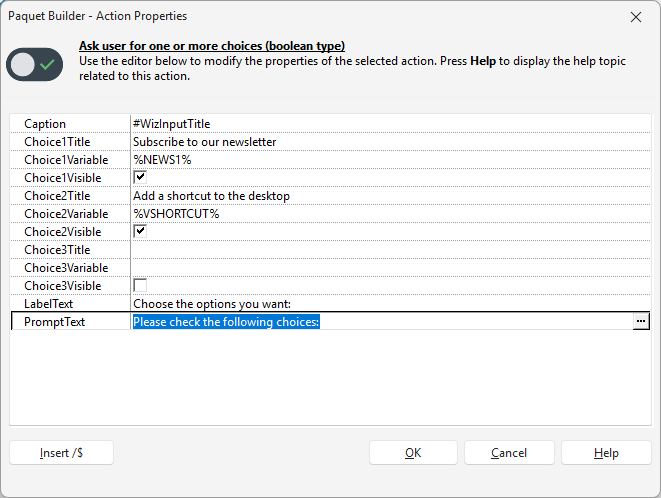
Section titled “Example”Properties for the screenshot below:
Additional Notes
Section titled “Additional Notes” Action Catalog Browse all available custom actions.