Command-line switches for packages
Paquet Builder allows you to define custom command-line switches for your packages and uninstallers. These switches can be used to enhance the flexibility and functionality of your packages.
Built-in command-line switches
Section titled “Built-in command-line switches”Starting with Paquet Builder 2026.1, installers and uninstallers recognize a few switches natively, with no custom action required to enable them.
| Switch | Scope | Effect |
|---|---|---|
/s or /silent | Installer and uninstaller | Activates silent mode: sets %SILENT% to 1 and suppresses standard dialog boxes. Matching is case-insensitive and uses exact token matching (no false positives from paths containing /s). |
/LCID <num> | Installer and uninstaller (multi-language projects only) | Overrides the runtime language. Sets %PBLANGID% to the specified Locale ID. Example: /LCID 1036 forces French. |
Both switches are parsed before any Initialization custom actions run, so your actions can read %SILENT% and %PBLANGID% as if the values came from the project itself. Any custom action that also writes to these variables still wins, so you can override the built-in behavior when needed.
Accessing the command line for packages and uninstallers
Section titled “Accessing the command line for packages and uninstallers”Paquet Builder provides several predefined variables that can be used in conjunction with custom actions to process command-line arguments.
| Variable name | Description |
|---|---|
%PARAMCOUNT% | Number of command-line parameters passed to the package. Defines how many %PARAMx% variables are available. |
%PARAM% | First command-line parameter passed to the package (if any); blank if none. |
%PARAM2% | Second command-line parameter passed to the package (if any); blank if none. |
%PARAM3% | Third command-line parameter passed to the package (if any); blank if none. Replace 3 with the desired parameter position (up to %PARAMCOUNT%). |
%PARAMx% | x-th parameter passed to the package (replace x with the position of the argument); blank if none. Valid values for x range from 2 to %PARAMCOUNT%. |
%PARAMS% | Entire command line passed to the package. |
Examples
Section titled “Examples”Command:
MYPACK.EXE /sValues:
%PARAMCOUNT%= 1%PARAM%=/s- Other
%PARAMx%variables are blank.
Command:
MYPACK.EXE /LCID 1024 /d "C:\My Documents\Data"Values:
%PARAMCOUNT%= 4%PARAM%=/LCID%PARAM2%=1024%PARAM3%=/d%PARAM4%=C:\My Documents\Data
Defining command-line switches
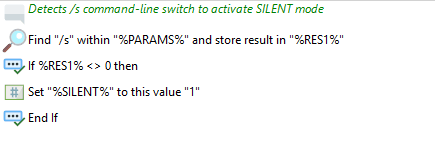
Section titled “Defining command-line switches”You can define custom switches using the custom action “Find one string within another”. This allows you to detect and process specific switches included in the command line.
Action Templates
Section titled “Action Templates”Paquet Builder provides action templates for common use cases. For example:
- Enable Silent Mode from Package Command Line: This template activates silent mode, suppressing all dialog boxes and messages when a specific switch is detected.
Example:
Section titled “Example:”To detect and process a /silent switch, use the provided template or create a custom action to parse %PARAMS% for the switch.