Add
Include a new language file (.pbr) in the project.
A language in Paquet Builder is a collection of resource strings translated into a specific language (e.g. English, French). Each language is stored in a .pbr file. By including several language files in your project, you create a multilingual package that adapts its text to the end user.
The Language Manager handles the collection of language files compiled into your package.
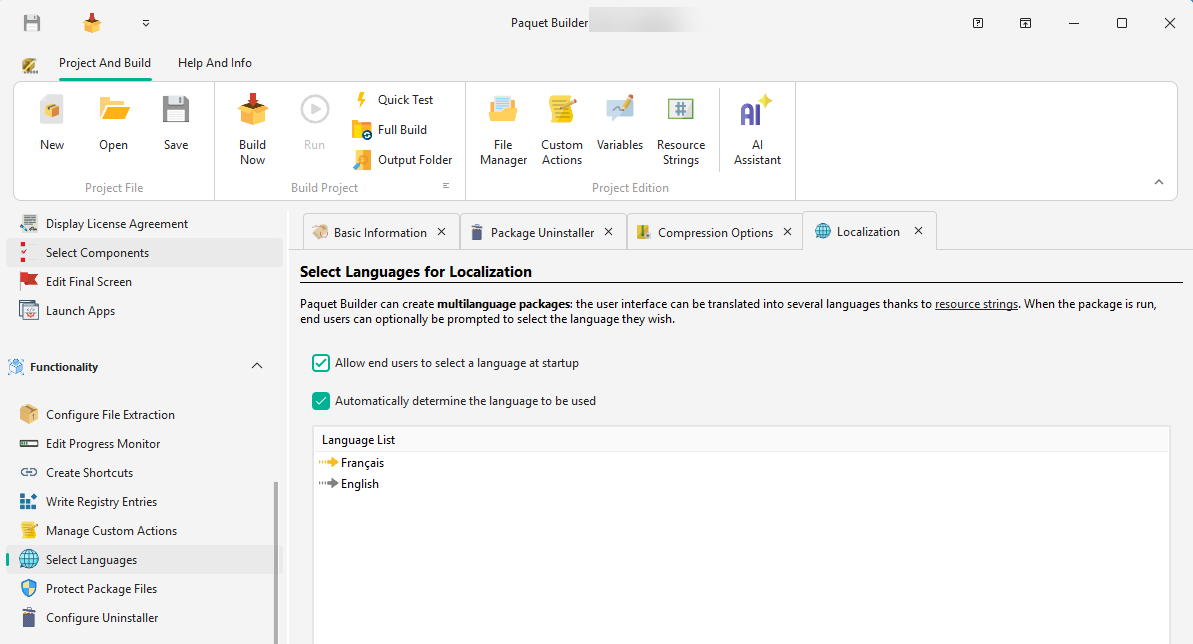
Add
Include a new language file (.pbr) in the project.
Edit
Double-click a language to open the Resource String Editor.
Default
Mark a language as the fallback (
Remove
Exclude a language from the compilation.

A dialog asks the user to choose from the available languages immediately upon launch.
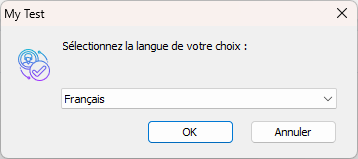
The package checks the operating system’s Locale ID (LCID) and matches it against the included languages. If a match is found, that language is used silently. The detected LCID is stored in %PBLANGID% and the language name in %SELLANG%.
The package first detects the system language automatically and pre-selects it in the language dialog. The user can still change the selection before continuing.
Enable Right-to-Left layout for languages such as Arabic or Hebrew. This option is set per language in the Resource String Editor.
Via custom action
Change the active language at any point by assigning a new LCID to %PBLANGID% using a Modify Variable action. For example, 1036 for French.
Via command line
Pass /LCID 1036 as a command-line argument to force a specific language. Since Paquet Builder 2026.1, this switch is recognized natively by both the installer and the uninstaller in multi-language projects; no custom action is required.
The default language acts as a fallback. If a resource string has no translation in the user’s selected language, the package uses the default language text instead.