Multi-volume Archive
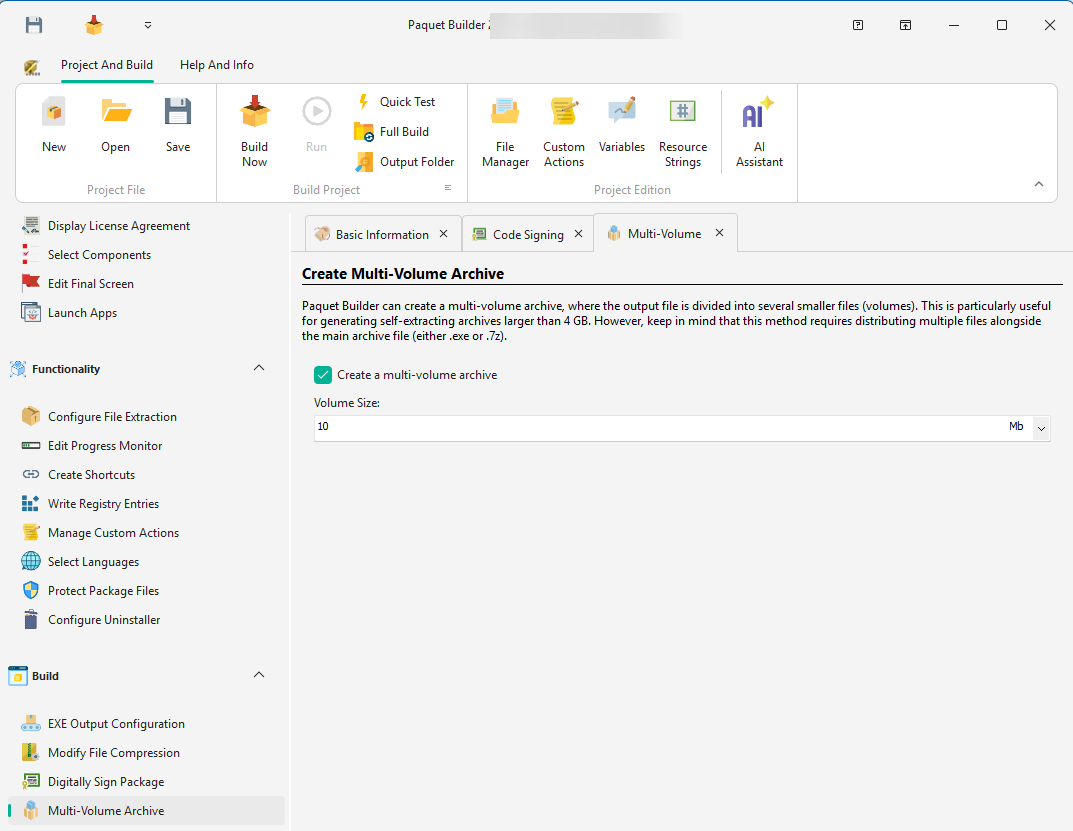
Paquet Builder allows you to create multi-volume archives, where the output file is split into smaller, more manageable files (volumes).
Why Use Multi-volume Archives?
Section titled “Why Use Multi-volume Archives?”Large single archive files can be difficult to share online or over networks, as they are prone to corruption and data loss. Multi-volume archives split the file into smaller chunks, making them easier to distribute and more resilient to issues during transfer.
Additionally, this feature enables the creation of Self-Extracting archives larger than 4 GB, bypassing the 4 GB limit for Windows EXE files.
Drawback
Section titled “Drawback”The main disadvantage is the need to distribute multiple files alongside the primary Self-Extracting archive (EXE).
Volume Size
Section titled “Volume Size”Specify the desired size for each volume in bytes. You can also use units like Gigabytes, Megabytes, or Kilobytes for convenience.
Output Filenames
Section titled “Output Filenames”Paquet Builder uses 7-Zip’s naming convention for multi-volume archives:
If the Package Filename is myarchive.exe, the generated volumes will be named:
myarchive.exemyarchive.exe.001myarchive.exe.002myarchive.exe.003
If the package type is set to Archive File, the generated 7z multi-volume archive will have filenames like:
myarchive.7z.001myarchive.7z.002myarchive.7z.003
Extracting a Multi-volume Archive
Section titled “Extracting a Multi-volume Archive”GSplit Advanced File Archiver
Section titled “GSplit Advanced File Archiver”For more advanced file splitting options, consider using GSplit, our free file splitter software. GSplit provides versatile features for managing split files.