Sign Installers with JSign
JSign is a free, open-source, Java-based code signing tool that supports a wide variety of keystores and cloud signing services:
- PFX / PKCS#12 certificate files
- Hardware tokens (ETOKEN, YUBIKEY, and other PKCS#11 devices)
- Azure Key Vault
- AWS KMS (Key Management Service)
- Google Cloud KMS
- HashiCorp Vault
- And many more
JSign is an excellent alternative when you need cloud-based key management or when the built-in signing tools (GSignCode, SignTool) don’t support your keystore type.
Prerequisites
Section titled “Prerequisites”-
Java must be installed and accessible on your system PATH (
java.exe) -
JSign JAR file: install via Chocolatey:
Terminal window choco install jsignOr download the JAR file manually from the JSign releases page.
-
Configure the JSign JAR path in Paquet Builder’s Environment Options under the Code Signing section.
Configuring JSign in Paquet Builder
Section titled “Configuring JSign in Paquet Builder”-
Open the Digital Signature settings page
-
Enable “Digitally sign my package”
-
In the Certificate Location dropdown, select JSign (option 5)
-
Enter your JSign signing command(s) in the command field
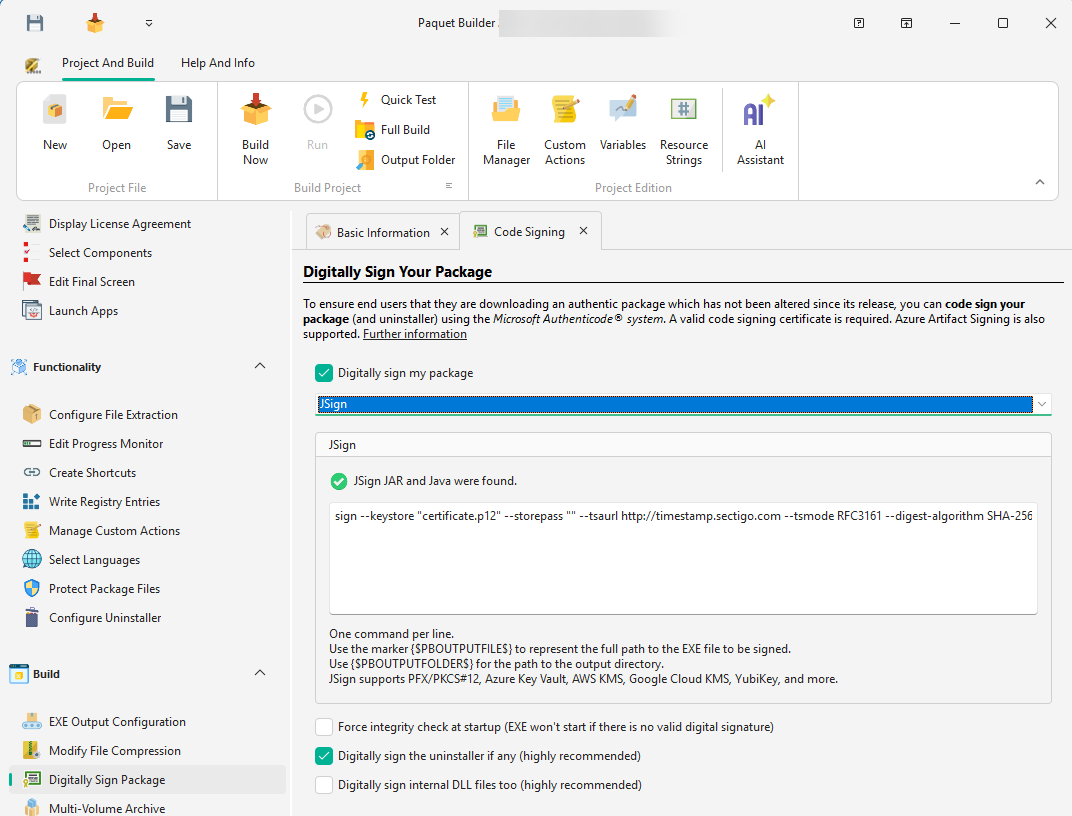
Command Placeholders
Section titled “Command Placeholders”Use these placeholders in your JSign commands (they are replaced with actual values at build time):
| Placeholder | Replaced With |
|---|---|
{$PBOUTPUTFILE$} | Full path to the output file being signed |
{$PBOUTPUTFOLDER$} | Path to the output folder |
Examples
Section titled “Examples”sign --keystore "C:\certs\mycert.p12" --storepass "mypassword" --tsaurl http://timestamp.sectigo.com --tsmode RFC3161 --digest-algorithm SHA-256 "{$PBOUTPUTFILE$}"sign --storetype AZUREKEYVAULT --keystore "myvaultname" --storepass "client_id|client_secret|tenant_id" --alias "my-certificate" --tsaurl http://timestamp.digicert.com --tsmode RFC3161 "{$PBOUTPUTFILE$}"sign --storetype AWS --keystore "us-east-1" --alias "alias/my-signing-key" --certfile "C:\certs\chain.pem" --tsaurl http://timestamp.digicert.com --tsmode RFC3161 "{$PBOUTPUTFILE$}"sign --storetype GOOGLECLOUD --keystore "projects/my-project/locations/global/keyRings/my-keyring" --alias "my-key/cryptoKeyVersions/1" --certfile "C:\certs\chain.pem" --tsaurl http://timestamp.digicert.com --tsmode RFC3161 "{$PBOUTPUTFILE$}"sign --storetype YUBIKEY --storepass "123456" --alias "X.509 Certificate for Digital Signature" --tsaurl http://timestamp.sectigo.com --tsmode RFC3161 "{$PBOUTPUTFILE$}"Directive Support
Section titled “Directive Support”When automating builds with directive files, set SignCertifLocation=5 in the [General] section and provide your JSign commands in a [JSignCmd] section:
[General]DigitalSign=1SignCertifLocation=5
[JSignCmd]0=sign --keystore "certificate.p12" --storepass "mypass" --tsaurl http://timestamp.sectigo.com --tsmode RFC3161 --digest-algorithm SHA-256 "{$PBOUTPUTFILE$}"
Each line in [JSignCmd] is a separate signing command, executed in order. This allows applying multiple signatures if needed.
Comparison with Other Signing Methods
Section titled “Comparison with Other Signing Methods”| Method | Cost | Cloud KMS | Hardware Tokens | Notes |
|---|---|---|---|---|
| GSignCode (built-in) | Free | No | Yes | Included with Paquet Builder |
| SignTool Commands | Free | No | Yes | Requires Windows SDK |
| Azure Artifact Signing | Pay-per-use | Azure only | No | Microsoft’s managed service |
| JSign | Free | Yes (Azure, AWS, GCP) | Yes | Open-source, cross-platform |