AI Assistant Overview
Paquet Builder includes a built-in AI-powered assistant that helps you configure your installer projects through natural language conversation. Instead of navigating dozens of settings pages, you can simply describe what you want, and the AI will propose the right changes.
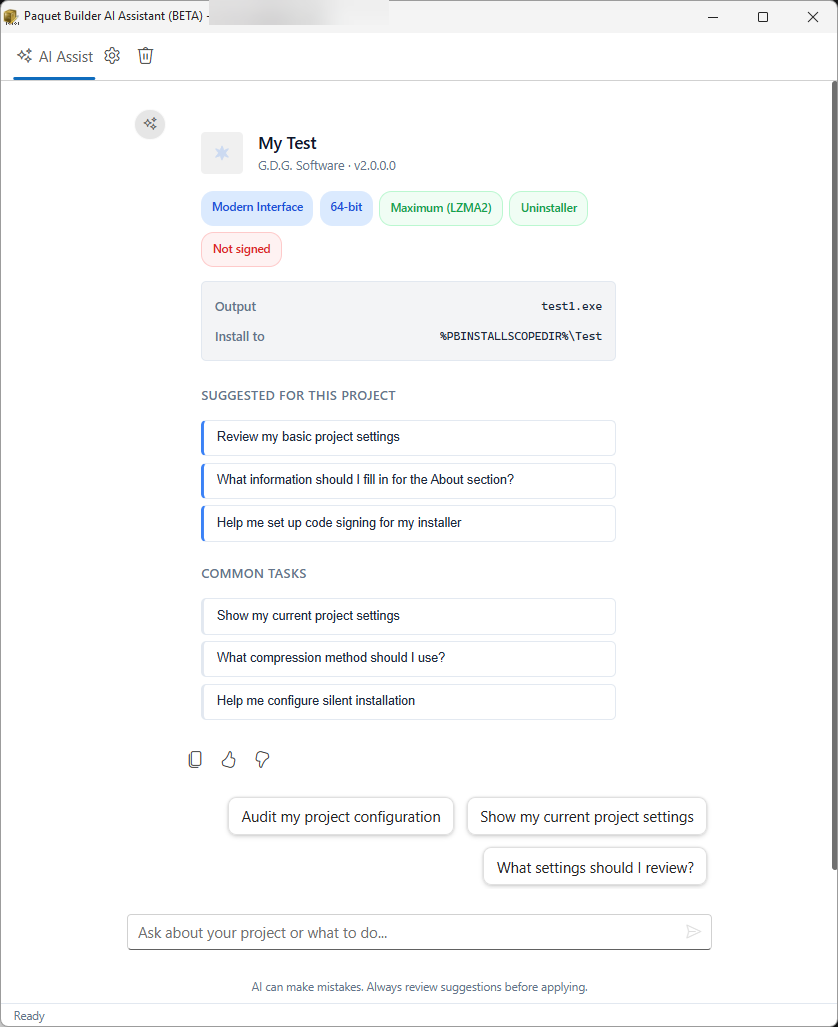
Key Capabilities
Section titled “Key Capabilities”The AI Assistant can:
- Configure 100+ project settings via natural language: compression, signing, encryption, scope, interface, and more
- Manage files and components: add source folders, create components, set file masks and properties via the File Manager
- Create and edit custom actions: shortcuts, registry entries, conditions, dialogs, across all 15 events
- Manage variables and localization: add variables, translate resource strings to multiple languages
- Search product documentation: find answers grounded in official docs, not guesswork
- Navigate the application: open any settings page, File Manager, or Custom Actions editor
- Compile projects and troubleshoot build errors
- Capture screenshots for visual context analysis
How It Works
Section titled “How It Works”The assistant connects to a cloud AI provider (OpenAI, Claude, Gemini, and others) or a local AI model (Ollama, LM Studio). When you ask a question or make a request, the AI:
-
Analyzes your project context: current settings, active page, project state
-
Uses specialized tools to read your configuration and search documentation
-
Proposes changes as reviewable action cards
-
Waits for your approval before applying anything
Proposed Action Cards
Section titled “Proposed Action Cards”
When the AI suggests changes, they appear as action cards in the chat window. Each card shows:
- A clear description of what will change
- Apply and Cancel buttons for individual control
- Apply All and Cancel All buttons for batch operations
After applying changes, the AI may display follow-up suggestion chips, which are clickable prompts for related tasks you might want to do next.
Context Awareness
Section titled “Context Awareness”The AI assistant automatically detects:
- Your current project: name, version, company, output path, architecture, compression, signing status
- Which settings page you are viewing, and tailors suggestions accordingly
- Which dialog you just closed, so it knows what you were working on
- Whether your project has potential issues: unsigned installer, missing uninstaller, etc.
Dark and Light Theme
Section titled “Dark and Light Theme”The AI assistant window automatically follows your application theme preference, providing a consistent visual experience in both light and dark modes.