Paquet Builder 2026.2: Archive Renaming, Uninstall and Signing Fixes
Paquet Builder 2026.2 is available now. This release adds three frequently requested authoring features (per-file archive renaming, an automatic previous-version uninstaller, and a new pre-welcome event) and fixes a code-signing failure that hit large installers. If your maintenance plan is active, it’s a free upgrade.
Ship a File Under a Different Name
By default, every file is stored inside the 7-Zip archive under its source filename. The new Archive Name tab in the File Properties dialog lets you store a file under a different name (or a different relative path) without keeping a manually renamed copy on disk.
This is the clean way to handle architecture-specific binaries. You can keep XlsPadlockDesigner32.exe and XlsPadlockDesigner64.exe side by side in your source tree, yet ship whichever one a build targets under the single generic name XlsPadlockDesigner.exe that your shortcuts, registry entries, and custom actions already reference. No copy step, no build script juggling filenames.
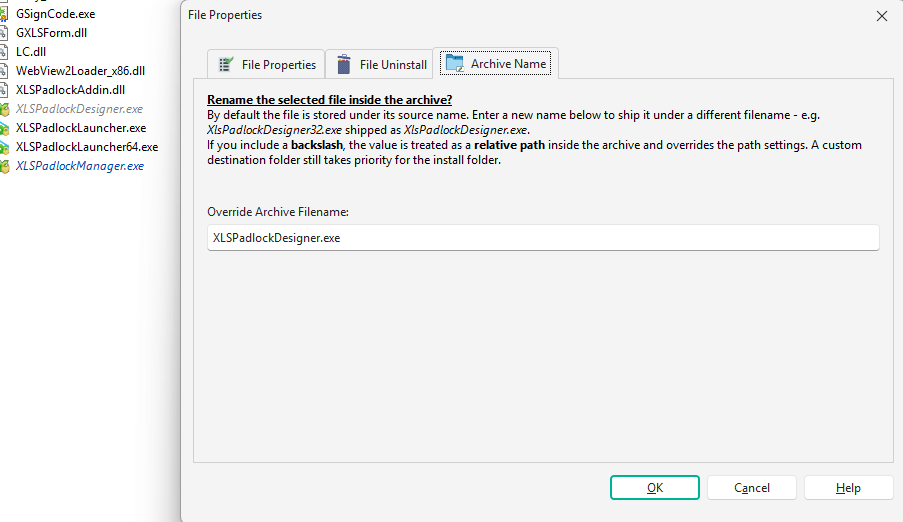
Renamed files are easy to audit: the File Manager shows the final packaged name in italics, so you can see at a glance which files are stored under an override. The override controls the stored name and the file’s runtime identity inside the package; it stays independent of the per-file Custom Destination Folder, which still decides where the file lands on the target system. See Override Archive Filename for the details.
Uninstall a Previous Version Automatically
Replacing an older install used to mean wiring up your own detection-and-removal logic. The new Uninstall a Previous Version custom action does it for you: it locates the previous version’s uninstaller, runs it, and, importantly, waits for that uninstall to actually finish before your installation continues.
- The previous uninstaller is found from the registry, with an explicit fallback path for products that don’t register an Add/Remove Programs entry.
- It can run silently (with a “please wait” panel), with its native interface, or fully hidden.
- The outcome is reported in
%PBPREVUNINSTRESULT%, so your project can branch on it: continue, warn the user, or defer a reboot until installation completes.
It’s backward compatible: uninstallers built by earlier versions are launched through the standard protocol. Versions built with 2026.2 and later additionally record their install scope and can report a “reboot required” outcome (3010), which is the reliable way to roll a single reboot to the very end of your setup.
Run Logic Before the Welcome Screen
2026.2 adds a new Before Welcome Screen custom action event. It runs after the setup language has been selected (so %SELLANG% and %PBLANGID% are already resolved) but before the welcome screen is displayed.
If you have language-dependent logic that has to run before the first screen appears (localized pre-flight checks, dynamic text, environment probing), this is the event that finally gives you the right window to do it in.
Sign Large Packages Reliably
Signing very large packages (roughly 300–400 MB and above) could fail when the signing tool was terminated before it finished hashing and timestamping the file. 2026.2 fixes that, and exposes the underlying limit as a setting: the signing timeout is now configurable in Environment Options → Code Signing (in seconds; default 300; 0 disables the timeout entirely).
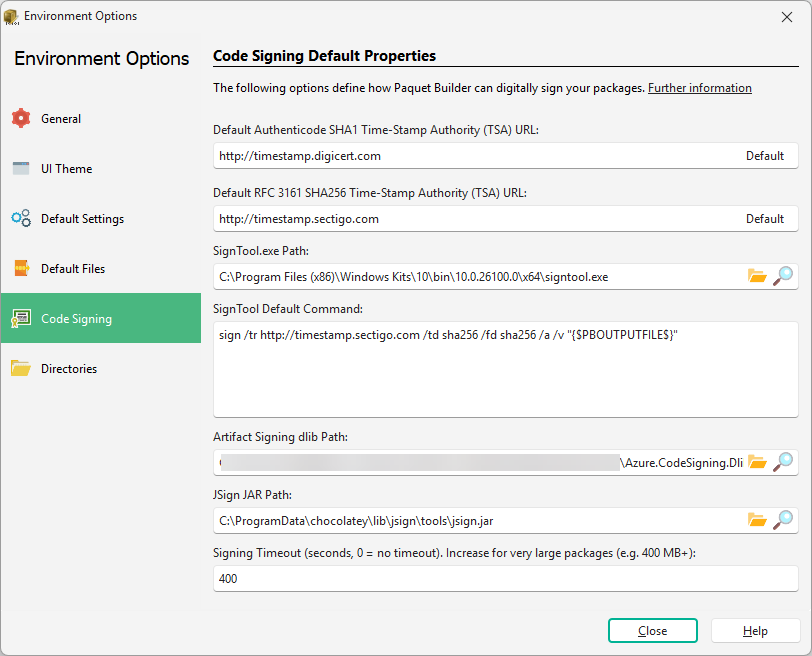
If you sign big installers in CI, where a slow timestamp server or a cold signing token can push a single operation past the old hard limit, this removes a frustrating class of intermittent build failures. See code signing with SignTool for the full signing setup.
Quality-of-Life Improvements
- Updated 7-Zip / LZMA SDK. Bumped to 26.02 across both extraction engines.
- Portable directive images. Directive files (
.pbd) can now set the Modern Interface header image through the newWizHeaderImagekey in[General], and theWizSplash,WizBanner, andWizHeaderImagepaths may be given relative to the directive file’s folder, so directive-driven builds stay portable when moved. - Clearer
.pbpxerrors. Opening a directory-based project whose_pbprojdatafolder is empty or incomplete (for example, copied without all its files) now reports a clear error naming the missing file instead of crashing. - Consistent command-line builds. Extension-less files (such as Adobe CMap resources) are no longer dropped from packages compiled on the command line when a folder is added with a
*.*wildcard. CLI builds now include exactly the same files as the graphical interface. - MCP insert fix. The
insert=startposition is no longer ignored when adding a custom action through the MCP server or the built-in AI assistant (actions were being appended at the end instead of inserted at the start).
See the full changelog for the complete list of changes.
Upgrade Today
Paquet Builder 2026.2 is a free upgrade for customers with an active maintenance plan. If your maintenance is current, download it from the customer portal; the in-app updater will also offer it on next launch (Help → Check for Updates). If your maintenance has lapsed, renew it to unlock 2026.2 and every future release. New to Paquet Builder? Grab the free trial from the download page.