Introducing Paquet Builder 2026
We are pleased to announce the general availability of Paquet Builder 2026, the most feature-rich release in our product’s two-decade history. This update delivers AI-driven tooling, ARM64 support, modern rendering, and a redesigned project format, along with dozens of quality-of-life improvements across the board.
Here is an overview of what’s new.
AI-Powered Assistant and MCP Server
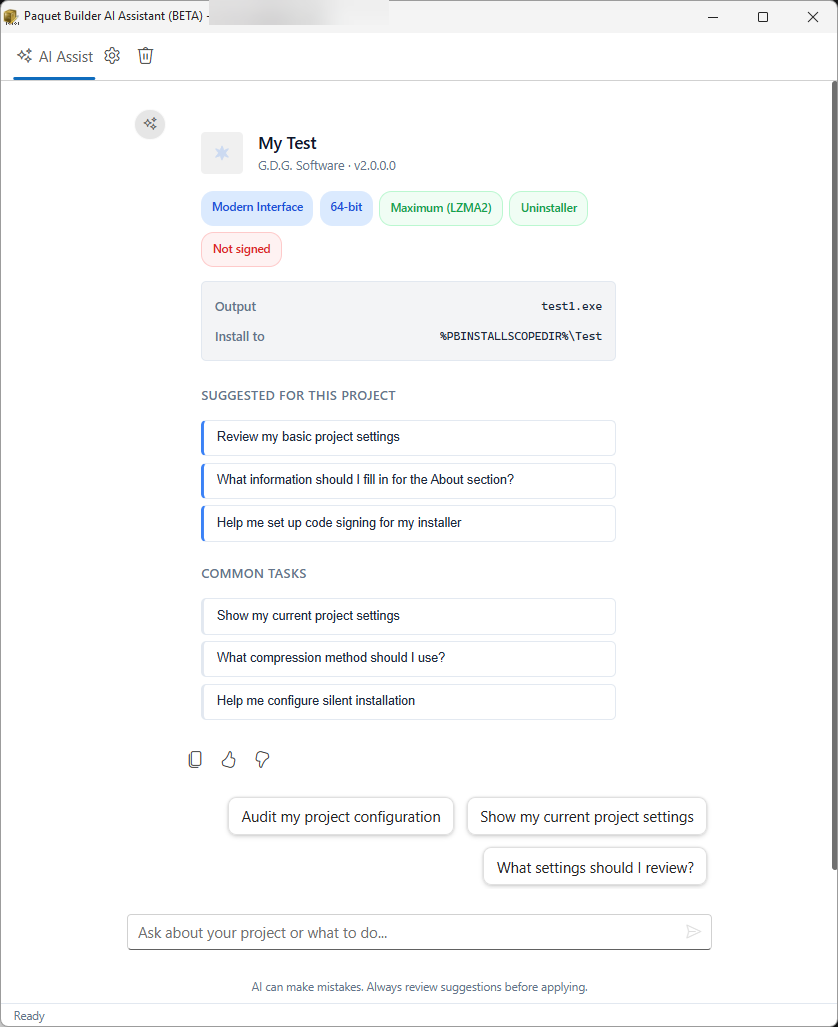
The built-in AI Assistant lets you configure your installer in plain English (or your native language). Describe what you need: file mappings, shortcuts, registry entries, custom actions and the assistant generates a valid project configuration. It supports multiple LLM providers: OpenAI, Claude, Gemini, Grok, Mistral, DeepSeek, Ollama, and LM Studio.
Beyond configuration, the assistant handles AI-driven translations: select resource strings and translate them to all project languages in one click.
For automation workflows, Paquet Builder 2026 also ships with a standalone MCP Server exposing 20 commands. Open, modify, compile, and save installer projects programmatically from Claude Code and other AI assistants. This opens up fully scriptable, AI-assisted installer pipelines without ever touching the GUI. Learn more about the MCP Server.
ARM64 Native Installers
Paquet Builder 2026 can now generate native ARM64 Windows installers alongside existing x86 and x64 targets. As Windows on ARM adoption grows, your installers will run natively on Snapdragon-powered devices and ARM-based virtual machines: no emulation layer, no performance penalty.
Installation Scope System
A new installation scope system replaces the manual configuration of paths, shortcuts, and registry hives. Choose from five modes:
- Current User: installs to the user’s profile without elevation.
- All Users: installs system-wide with admin privileges.
- User Choice: lets the end user decide at install time.
- Automatic: detects whether the user has admin rights and adjusts accordingly.
- None: no scope logic (for self-extracting packages that don’t need it).
Paths, shortcut locations, registry roots, and UAC prompts all adjust automatically based on the selected scope.
WebView2 Dialogs
Installer dialogs (welcome screens, EULA, readme, and custom panels) now render using WebView2, Microsoft’s Chromium-based rendering engine. This means full HTML and CSS support: custom fonts, responsive layouts, embedded images, and styled content.
A built-in CSS editor lets you customize dialog stylesheets directly in the IDE. On systems where WebView2 is unavailable, dialogs fall back to the legacy Markdown renderer automatically.
JSign Code Signing
Alongside the existing SignTool and Azure Artifact Signing integrations, Paquet Builder 2026 adds support for JSign, a free, open-source Java-based code signing tool. JSign works with:
- PFX certificates (file-based)
- Hardware tokens (EToken, YubiKey)
- Cloud key vaults (Azure Key Vault, AWS KMS, Google Cloud KMS)
This gives teams a vendor-neutral signing option that runs on any platform with a JRE, including CI/CD containers where the full Windows SDK is not available.
New Project Format (.pbpx)
The default project format is now directory-based (.pbpx). Instead of a single ZIP archive, your project is stored as a set of XML files on disk. This brings several practical benefits:
- Version control friendly: diffs are meaningful; merge conflicts are manageable.
- External change detection: the IDE detects out-of-band edits and reloads automatically.
- Faster saves: no recompression on every save.
Existing .pbpx (ZIP-based) projects continue to work. You can convert between formats at any time from the backstage view.
Enhanced Compilers
The console compiler now outputs structured JSON alongside its traditional text output, making it straightforward to parse build results in CI/CD pipelines and feed status information into deployment dashboards.
Other compiler improvements include:
- LZMA SDK upgraded to 26.00 with faster multi-threaded compression.
- Full directive export with 68+ parameters, component definitions, and screen templates.
- Long path support up to 2,048 characters across installer and uninstaller operations.
- Standardized exit codes for reliable pipeline integration.
Quality-of-Life Improvements
- Custom actions Undo/Redo (Ctrl+Z / Ctrl+Y) with up to 30 levels of history.
- In-app auto-update with background checking, release notes display, and Authenticode verification (no admin rights required to check for updates).
- Drag-and-drop folders in the File Manager with optional subfolder scanning.
- Modernized compilation log with card-based UI, build phase stepper, collapsible sections, and dark mode.
- New runtime variable
%OSARCH%returningx86,x64, orARM64. - Completely rewritten documentation, integrated into the software and available online.
- An offline PDF manual is also available: Installer and SFX Creation Guide.
See the full changelog for the complete list of changes, including all bug fixes.
Upgrade Today
Existing customers with active maintenance can upgrade at no additional cost through the customer portal. If your maintenance has expired, you can renew it at a discounted rate from the same portal. New users can download the free version to explore everything Paquet Builder 2026 has to offer.
Our documentation and support team are available to help you get started.